
适用平台:
Windows
适用版本:
所有版本
问题描述
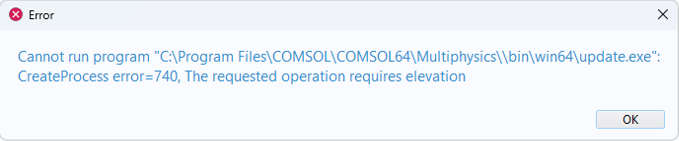
After going toFile > Help > Check for Product UpdatesI get the following error
解决方法
This issue seems to arise from a Windows Security update. There are two suggested workarounds
Launch COMSOL Multiphysics with administrator privileges.
To do this, right-click on your COMSOL Multiphysics shortcut and selectRun as Administrator
When the program has opened go toFile > Help > Check for Product Updatesto start the update process.
Launch the update executable directly.
To do this, go to theCOMSOL Multiphysics 6.4 > COMSOL Launchersdirectory on the Start menu. From theCOMSOL Launchersdirectory, run the shortcut calledUpdate. If you use an older version than 6.4, go to the correspondingCOMSOL Launchersdirectory.
COMSOL 已尽一切合理的努力核实本页面所提供的信息。但请注意,所有资源与文档仅供学习参考。COMSOL 不对其有效性作任何明示或暗示的声明,亦不承担因所披露数据的准确性而产生的任何法律责任。本文提及的所有商标均为其各自所有者的财产。有关完整的商标信息,请参阅相关产品手册。


