
Creating a Multiphysics-Driven Gaussian Process Surrogate Model
To create aGaussian Process(GP) surrogate model, we will continue working with the thermal actuator tutorial model and dataset fromPart 3of this course. In this part, we will focus on the practicalities of adding and training aGaussian Processfunction. For more information, the theoretical background and settings for this type of surrogate model are covered in a separate resource discussingGaussian Processsurrogate models.
Note: This example and demonstration requires the Uncertainty Quantification Module.
Gaussian Process Model Overview and Comparison to Deep Neural Network Model
GP surrogate models are based on a generalization of linear regression calledGaussian process regression, orGP regressionfor short. Another name for this method isKriging, a method rooted in geostatistics, particularly in gold ore prospecting in the 1950s. The goal was to develop a statistical method that could make reliable predictions based on very few measurements, or samples. Generally, a GP surrogate model should be considered instead of a deep neural network (DNN) model if:
- Model computation is expensive, and you can only afford to compute a small number of data points (input parameter–output value sets)
- You want to avoid defining a surrogate model such as a DNN with layer architecture by trial and error
- You have fewer than a few thousand data points
- You want to estimate uncertainty in the model
The GP surrogate model has a default limit of 2000 data points due to the underlying algorithm's constraints. However, you can increase this limit slightly, depending on the computational power of your computer. In contrast, the DNN surrogate model has no such limitation and can be trained on millions of data points. However, while a DNN model requires testing many network architectures, a GP model works with less user input and provides well-calibrated uncertainty estimates.
Building a Gaussian Process Surrogate Model
Continue working with the model from Part 3. If you have access to the Uncertainty Quantification Module, then you can add a GP surrogate model function through theGlobal Definitionsnode by clickingFunctionsand selectingGaussian Process.
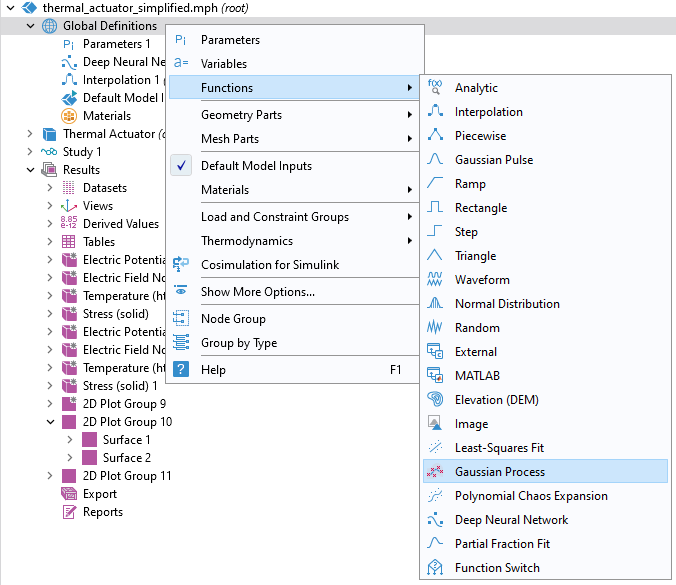
Adding aGaussian Processfunction.
In theDatasection settings for theGaussian Processfunction, selectResults tableas theData sourceand make sure theResult tableis set toDesign Data. This will enable you to use the same dataset that we used for theDeep Neural Networkfunction in Part 3. TheData Column Settingswill automatically be filled out with the correct names forArgumentandFunction values:L,DV, andcomp1.point1for the actuator length, applied voltage, andPoint Probe, respectively. The default name for theGaussian Processfunction is set togpm1.
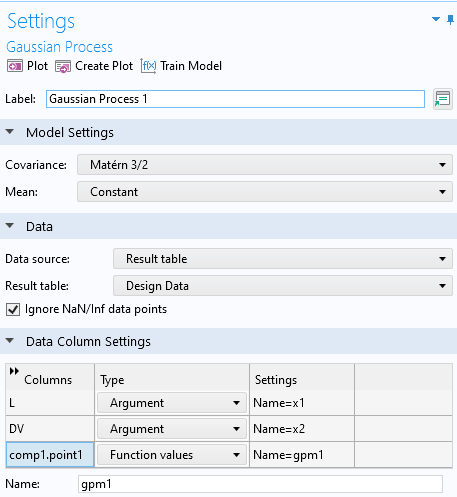
The settings for theGaussian Processfunction.
TheIgnore NaN/Inf data pointscheckbox is selected by default and ensures that the training doesn't stop if the data table contains entries with Not a Number (NaN) or infinite (Inf) values. This can be the case, for example, when the physical model used to generate the data didn't converge for certain input parameters.
We have now defined all the settings we need before training. ClickTrain Modelat the top of theGaussian ProcessfunctionSettingswindow. The training is almost instantaneous since we only have 50 data points.
For function visualization, we will make a copy of a previousSurfaceplot and modify the settings. To do so, right-click2D Plot Group 11>Surface 2and selectDuplicate. Change theExpressiontogpm1(x1,x2)and clickPlot. Change theColor tabletoMagma, for example, to more easily identify the different plots. The functions are near identical except for in one corner where the automatic DOE sampling didn't quite reach the corner when using only 50 data points. You can also easily visualize just theGaussian Processfunction by disabling the first twoSurfaceplots.
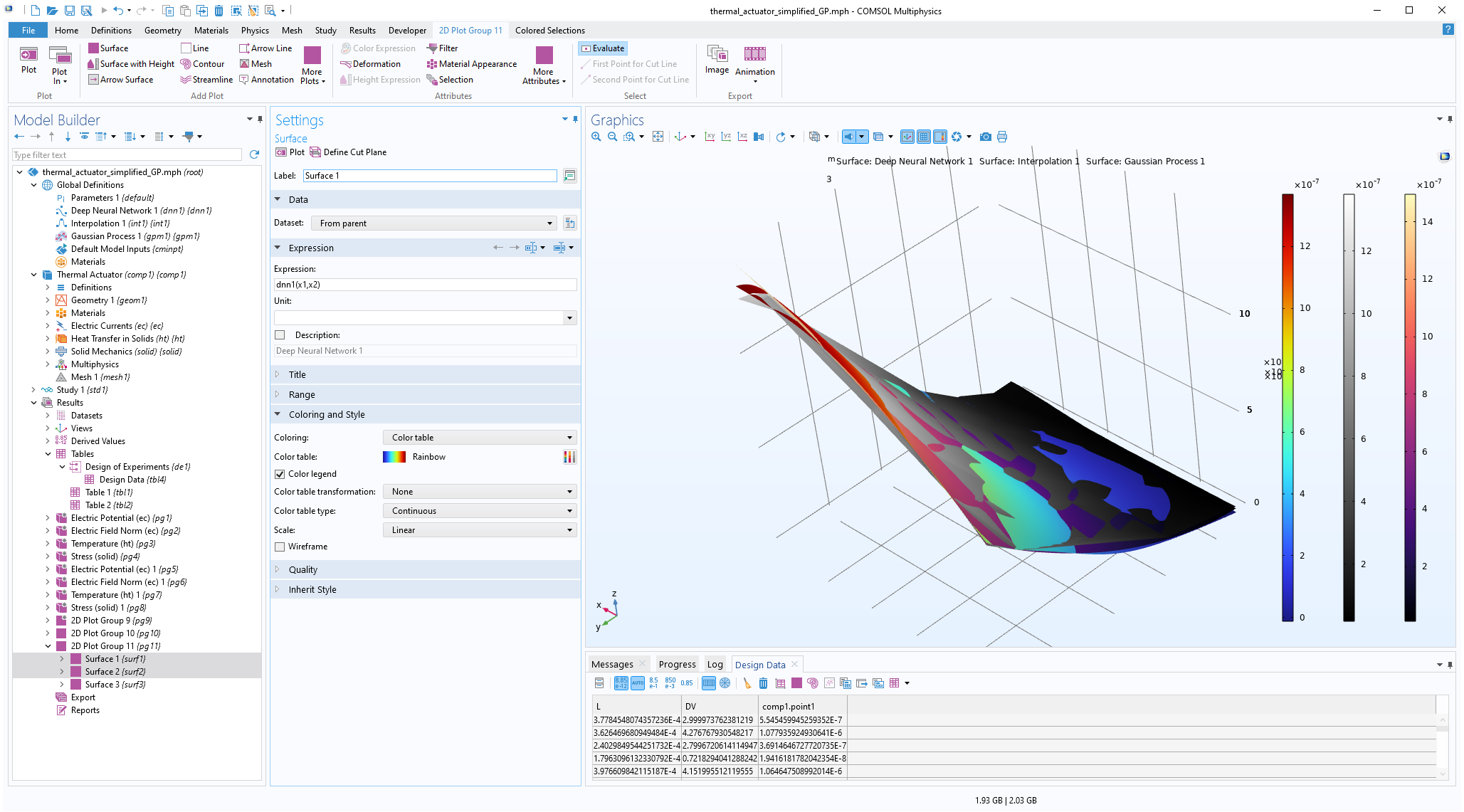 The Model Builder with the Surface 1 plot selected under the 2D Plot Group 11 node and the corresponding Settings window and Graphics window displayed. The Graphics window shows a rectangular-shaped surface plot in 3D space that partially displays a rainbow color distribution from dark red to dark blue, partially displays a grayscale color distribution from white to black, and partially displays a heat camera color distribution from dark purple to a light yellow.
Visualizing theGaussian Processfunction alongside the linear interpolation and DNN functions.
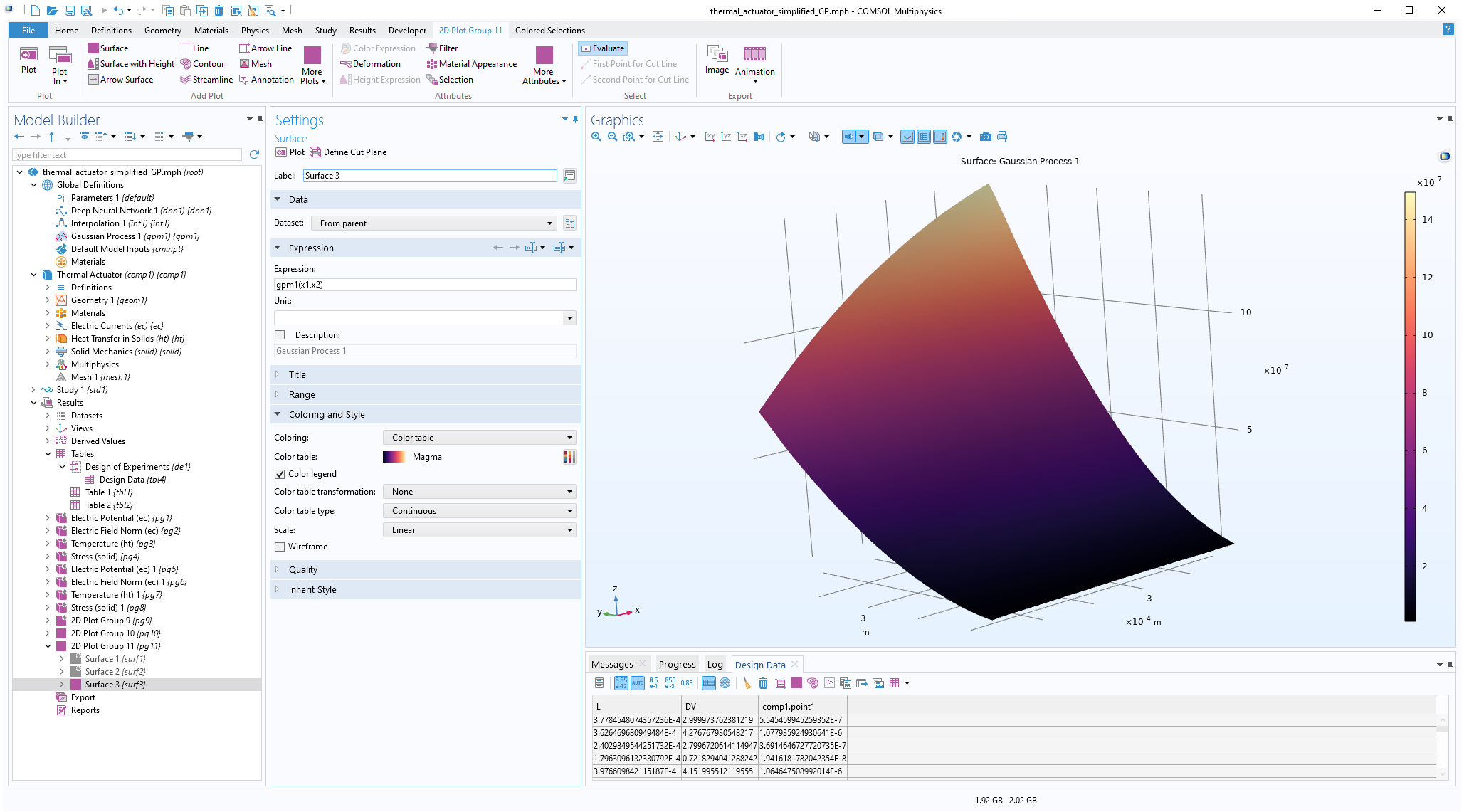 The Model Builder with the Surface 3 plot selected under the 2D Plot Group 11 node and the corresponding Settings window and Graphics window displayed. The Graphics window shows a rectangular-shaped surface plot in 3D space that displays a heat camera color distribution from dark purple to a light yellow.
Visualizing theGaussian Processfunction.
Model Uncertainty
In order to assess the uncertainty in the model, we can visualize the estimated standard deviation. To do this, go back to theGaussian Processfunction window. In theRelated Functionssection, selectDefine standard deviation function. This makes agpm1_stddevfunction available that can be visualized and evaluated just like any other function.
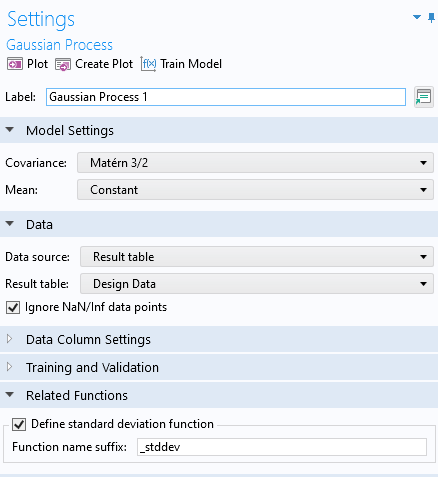
Enabling the standard deviation function for theGaussian Processfunction.
To visualize the standard deviation estimator, inResultsclickSurface 3>Hight Expressionfor theGaussian Processvisualization plot group. Change the height data setting toExpressionand typegpm1(x1,x2). Now, click theSurface 3plot and change the expression togpm1_stddev(x1,x2). These settings will display the function value as a height and the standard deviation as a color. At this stage, you can also disable theSurface 1andSurface 2plots. In this case, change theColor tabletoThermalfor a clearer visualization. The uncertainty will be the lowest at the DOE sampling points, which in this visualization can be seen in darker color.
 The Model Builder with the Surface 3 plot selected under the 2D Plot Group 10 node and the corresponding Settings window and Graphics window displayed. The Graphics window shows a surface plot with a rectangular shape that displays orange for the majority of the surface area and contains many dark red dots throughout.
The standard deviation function for the GP function.
To instead visualize the standard deviation in nanometers, change the expression to1e9*gpm1_stddev(x1,x2). The maximum standard deviation value is about 9 nanometers, as shown in the figure below. To enable the display of maximum and minimum values in the color legend, select theShow maximum and minimum valuescheckbox in the2D Plot Group 11node.
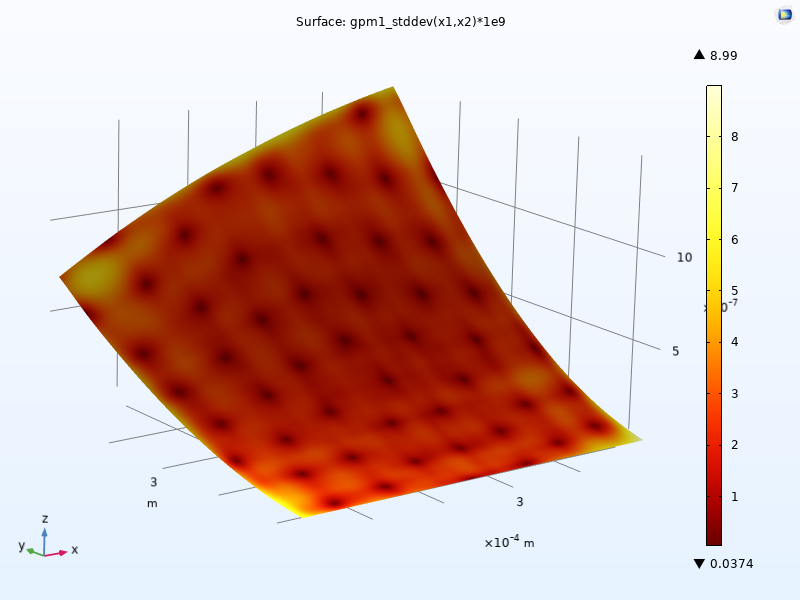
The standard deviation plot scaled to nanometers. A thermal color table is used.
The standard deviation values give an estimate of the uncertainty of the fitz=f(x1,x2)at each point (x1,x2) and is one of the advantages of a GP-based surrogate model. This type of uncertainty estimate is not available for the DNN surrogate model.
A GP surrogate model has a statistical interpretation where the functiongpm1(x1,x2)is the predicted mean value of the model; there is one mean value at each input parameter pair. The standard deviation values represent the model's uncertainty about this predicted mean function. A higher standard deviation indicates greater uncertainty, while a lower standard deviation indicates higher confidence in the prediction. In regions where there are more data points (also calledtraining data points) there will generally be a lower standard deviation because the model is more confident in its predictions in these areas. Conversely, in regions with fewer or no training data points, there will typically be a higher standard deviation, indicating that the model is less certain about its predictions in these areas.
The standard deviation can be used for confidence intervals around the predicted mean. For example, a 95% confidence interval for the prediction at a point (x1,x2) is given by[gpm1(x1,x2)-1.96*gpm1_stddev(x1,x2), gpm1(x1,x2)+1.96*gpm1_stddev(x1,x2)].
This interval represents the range within which the true function value is expected to lie with 95% confidence. The value 1.96 approximately corresponds to the point for which the cumulative distribution function, of a normal distribution, equals 0.975.
In addition to the density of data points, the uncertainty estimates depend on the choice of covariance function. For more information on covariance functions and the statistical properties of a GP surrogate model, seethis resource on covariance functions.
Adaptive Gaussian Process
The standard deviation indicates an error boundary around the predicted values. A high standard deviation suggests that the true value could significantly differ from the predicted mean function, highlighting the need for more data points. The Uncertainty Quantification Module includes a solver option that capitalizes on this to select new sample points. TheAdaptive Gaussian processmethod available in theUncertainty Quantificationstudy adaptively inserts new sample points in the input space where the confidence is low. Let's see how to use this option for the thermal actuator example, building on the previous example.
Right-clickStudy 1and selectUncertainty Quantification>Uncertainty Quantification.
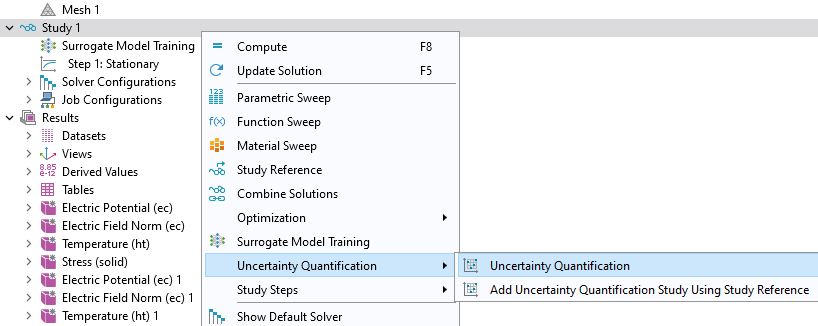 The model tree with the Study 1 node selected and the corresponding menu shown, with the Uncertainty Quantification section expanded and the Uncertainty Quantification study selected.
Adding anUncertainty Quantificationstudy.
This study requires removing theSurrogate Model Trainingstudy. ClickYesin the dialog that asks you if you want to remove theSurrogate Model Trainingstudy.
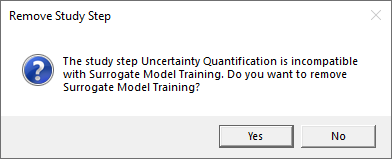
Replacing theSurrogate Model Trainingstudy with theUncertainty Quantificationstudy.
TheUncertainty Quantificationstudy has similarities with theSurrogate Model Training Studyin that it requires you to defineQuantities of InterestandInput Parameters. Furthermore, it uses the same type of design of experiments method for sampling in the input space. TheUncertainty Quantificationstudy includes five different study types, and we will selectUncertainty propagationfrom theUQ study typemenu. To learn more about these study types, see the Learning Center entry "Using Uncertainty Quantification to Model Frequency Variation in a MEMS Resonator".
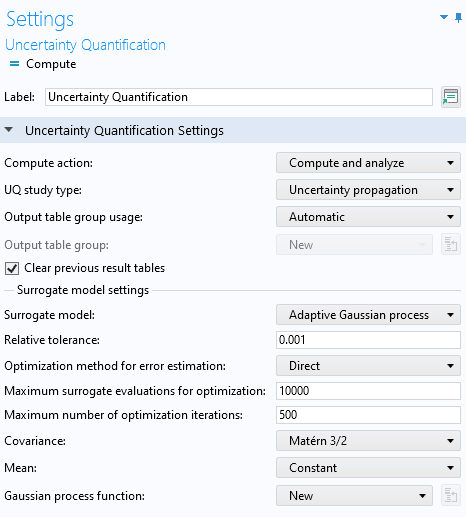
TheUncertainty Quantificationstudy settings with theUncertainty propagationandAdaptive Gaussian processoptions selected.
Make sure that you have selected theUncertainty propagationoption. The defaultSurrogate modeltype forUncertainty propagationisAdaptive Gaussian process. Just like in theSurrogate Model Trainingcase, entercomp1.point1as theExpressionforQuantities of InterestandLandDVfor theInput Parameters. In this case, we stick to SI units. TheLower boundandUpper boundare: [150e-6, 400e-6] for the length,L, and [0.5,5] for the applied voltage,DV.
TheDistributionsetting is set toUniform, which is the only option that makes sense in the example where we would like to create a surrogate model that can be used equally well in any part of the parameter space. However, when performing an uncertainty quantification analysis, it can be relevant to change this to, for example, aNormal distribution, in case your input variable follows this statistical distribution. TheUncertainty Quantificationstudy settings are shown in the figure below.
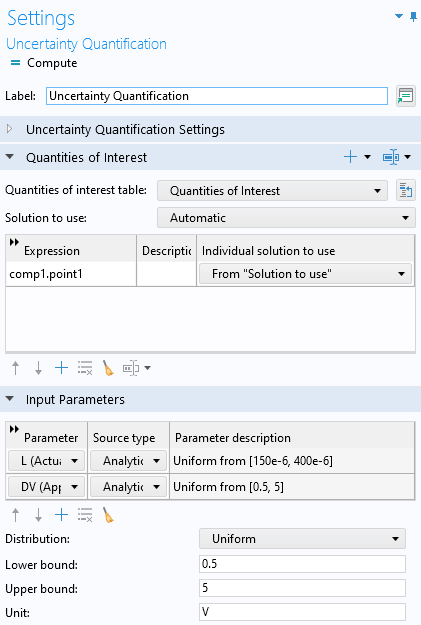
TheUncertainty Quantificationstudy settings for the Adaptive Gaussian process.
ClickComputeto start the adaptive process, which will take a few minutes of computation time. By default, the maximum number of sampled points (computed solutions) is set to 40. You can change this setting in theInput parameters sampling settingssection.
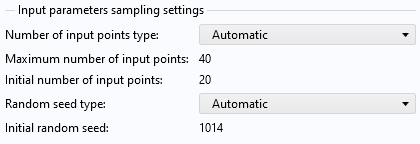
The input parameters sampling settings.
TheUncertainty Quantificationstudy will automatically create and train a new GP model and place it underGlobal Definitions>Functions.
In the case of anUncertainty Quantificationstudy, the sampled variables are output to aQuantities of Interesttable, rather than aDesign Datatable.
When the computation is finished, the plot shown is a kernel density estimation (KDE) plot of the probability density function estimate for the maximum displacement, as shown in the figure below. This plot shows which maximum displacement values are most likely to occur when the input parameter space is uniformly sampled within the set parameter boundaries.
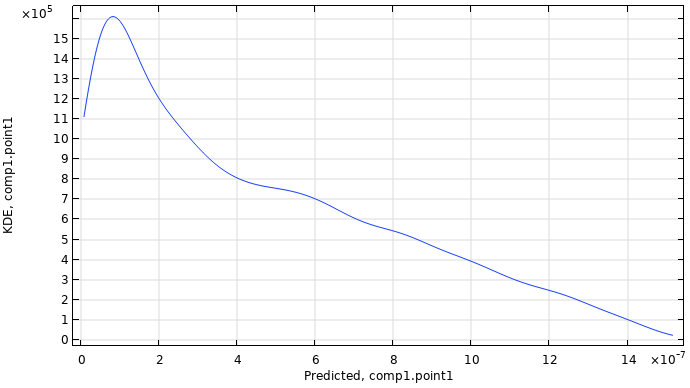
A KDE plot showing the probability density function estimate for the maximum displacement.
The figure below shows a comparison of the 50 data point nonadaptive GP function versus the 40 data point adaptive GP function. They are nearly indistinguishable. In a scenario with many input parameters (a large input parameter space), the adaptive method will typically be much more efficient. Note that in this case, all of the computations were done with SI units to keep things simple.
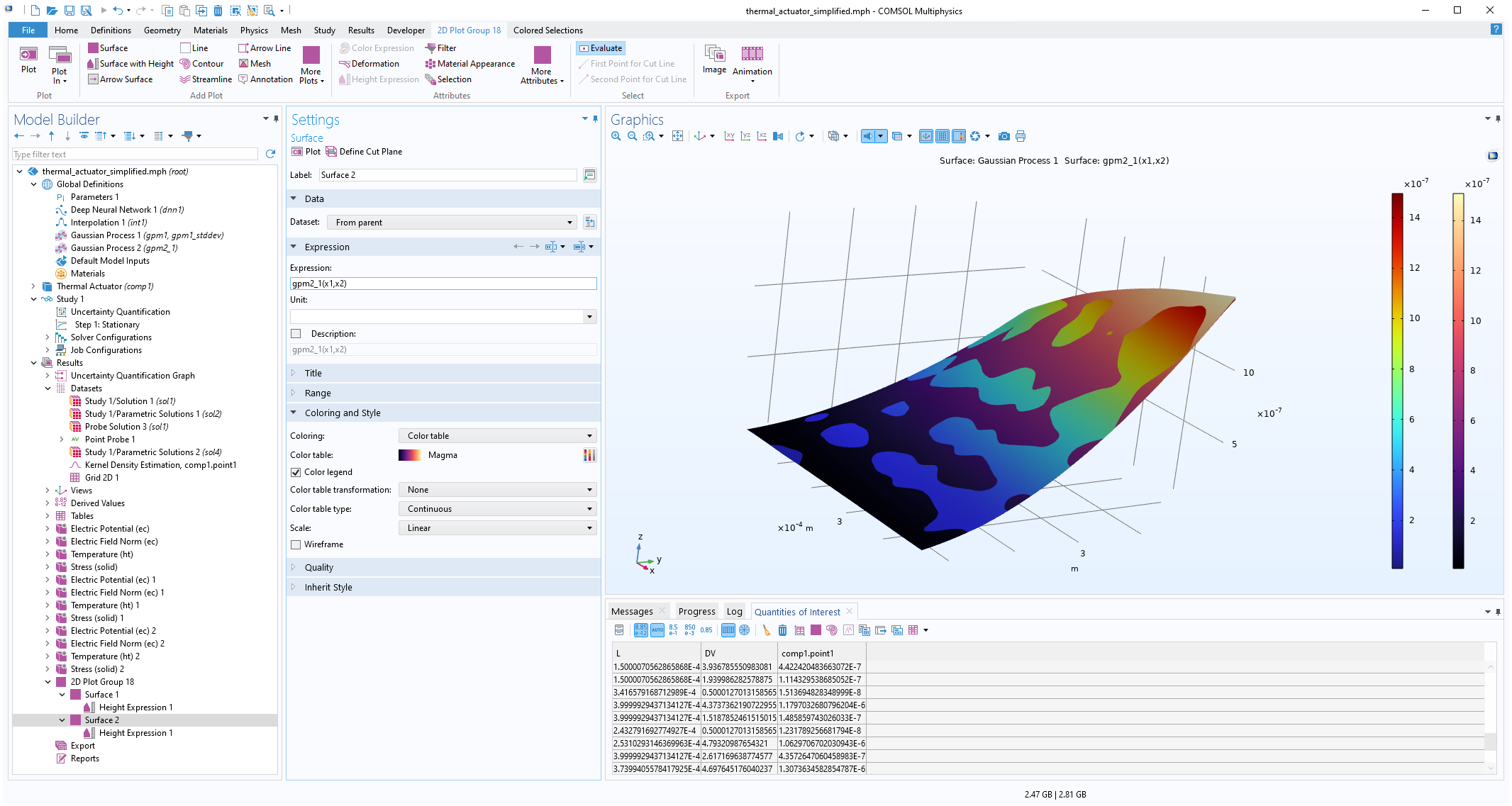 The Model Builder with the Surface 2 plot selected under the 2D Plot Group 18 node and the corresponding Settings window and Graphics window displayed. The Graphics window shows a rectangular-shaped surface plot in 3D space that displays a rainbow color distribution varying from dark blue to dark red and a heat camera color distribution varying from dark purple to a light yellow.
A comparison of the nonadaptive and adaptive GP functions.
Just as in the previous case, we can plot the standard deviation. To do so, select theDefine standard deviation functioncheckbox in theRelated Functionssection of theGaussian ProcessfunctionSettingswindow. Then, train the model and create a plot with the GP function as the height expression and the standard deviation function as theSurfaceplot expression. Change the color table toThermal, as shown in the figure below. In this visualization, like in the previous example, theSurfaceplot expression has been multiplied by 1e9 to scale to nanometers. This allows us to see where the adaptive sampling points were chosen as the locations with darker color. We can also see that the adaptive approach gives us a model with higher confidence than previously, with a maximum standard deviation of about 5.6 nm versus the earlier 10 nm.
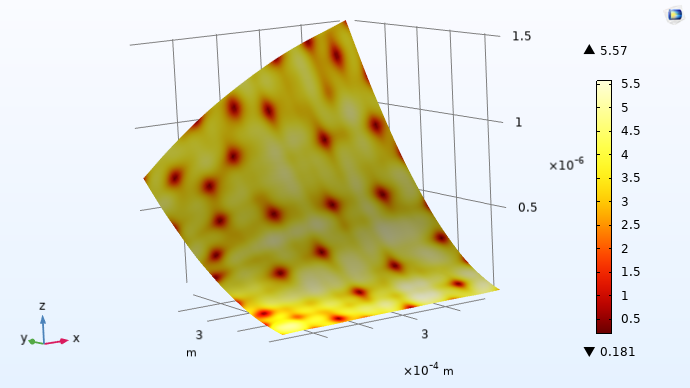
The standard deviation function for the adaptive Gaussian process.
请提交与此页面相关的反馈,或点击此处联系技术支持。